Overview
There can be multiple QA phases during testing of a campaigns.
Phase 1
Here’s how the Phase-1 process of QA testing at OptiPhoenix looks:
- Read the brief and understand the requirements
- Go through the website and relate with design
- Match “the briefing by dev” and “the instructions in actual brief”
- Copy the General Checklist from the QA sheet
- Add your own Use cases in the QA sheet ( Copy the requirements from the brief if mentioned + Create your own test cases )
- Perform the testing on the website according to the test cases
- Before providing the testing results to the dev, match if everything is done from the Checklist
Phase 2
Phase 2 of testing involves retesting, and goal verifications. Here’s how the Phase 2 might look:
- Verify the bugs fixed by the developer
- Update the status in the sheet
- Check on live by applying cookie (if applicable)
- Verify the Target, Audience, Integration, Goals in CRO tool
- Give Final Feedback to the dev (if any)
Ways of Testing
There are different ways to test a campaign. These methods are not mutually exclusive and may be used one after the other in different phases of testing. Here’s how one can test a campaign:
1. By using preview links
A preview link is provided by the dev in the trello card or can be obtained from the AB Testing tool. It consist of (the test url + a preview parameter). For example, https://www.xbox.com/en-US?at_preview_token=4FhxMZZq5RXQNNpOOuFqCCp&at_preview_index=1
The part of the URL before the question mark is the test url on which our campaign is running and the bold part starting from “?…” is our preview parameter generated by the CRO tool. The length of preview parameter may vary for different CRO tools.
All the tester needs to do is to just paste the preview link in the browser and open the page.
The campaign should be visible.
2. By using Live Cookie
Campaigns may be pushed live for an audience that contains a customised cookie. This allows the tester to test the campaign in a real and more accurate environment compared to the previous method which used preview links. Hence, it is a beneficial and important way to test the campaign, but it is not always possible as it may require approval from client.
After the campaign has been pushed live on a customised cookie, for example cfQA cookie, all the tester needs to do is:
- Open the test page URL
- Open console in dev tools
- Add the cookie code provided by the devs
- Refresh the page
Here’s an example of the cookie code one might be given for a customized cookie ‘cfQA’ `document.cookie=”cfQA=true;path=/”;
A test remains part of the campaign as long as they have the cookie and still meet the targeting requirements.
3. By using JS and CSS
Sometimes we may not have the access to the CRO tool. In this case, we can’t generate a preview link or push the campaign live on a cookie in the initial phase. In this method, we may only have the Test page URL, and a combined or separate notepad links with the JS code and CSS. This is the primary method of unit testing by developers but is usually followed by the other ways of testing in later phases. This cannot be used to test on mobile devices without connecting your mobile to a laptop, or without the use of an emulator tool like Browserstack.
Here are steps to follow:
For chrome
- Download an extension for chrome - User JavaScript and CSS
- Open Test Page URL
-
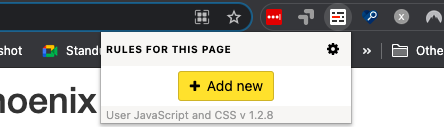
Click on the extension and add a new snippet
-
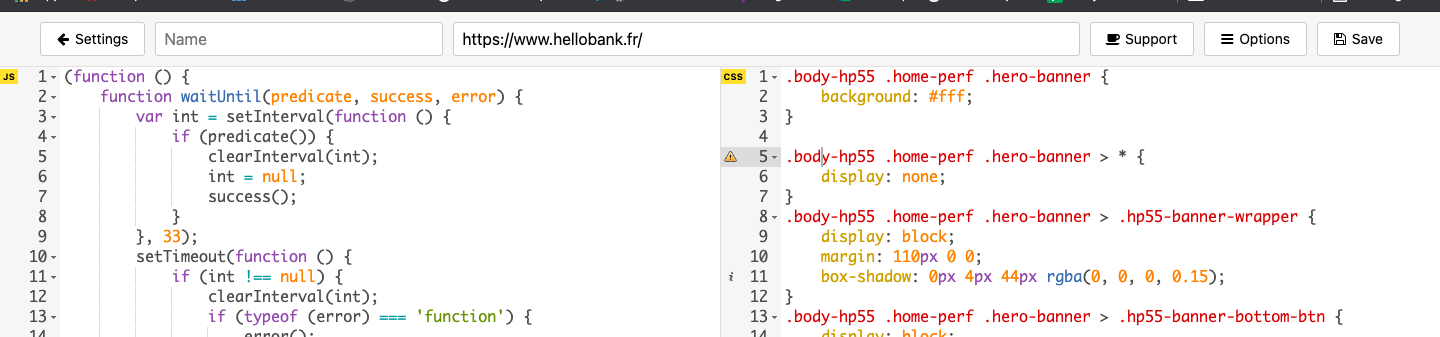
Add the JS code in JS area and CSS ( if any ) into the CSS area
- Go back to the Test Page Tab
-
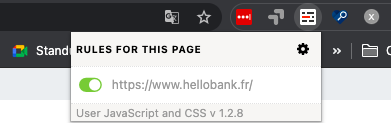
Click on extension again to make sure the snippet is turned ON
- Refresh the page and changes should be visible
For other browsers
- Open dev tools
- Paste JS code in console
- Add a style tag inside the body tag of the HTML
<style> ...css here... </style>
Goals Verification
These campaigns are built to test how a user might react to change, and how much they like this experience compared to the control. Goals or metrics provide us the analytical data from AB Testing that helps us figure out if a campaign was successful or not. Hence, they are the most crucial part of AB Testing and need special attention to verify before we deliver a campaign.
Click here to read more about goals and how we can test them.