Single Page Applications (SPAs) introduce unique challenges for A/B testing tools. Unlike traditional multi-page websites, SPAs do not reload the page on navigation, which directly impacts how tool evaluates audiences, runs experiments, and tracks impressions.
This section explains how to correctly handle SPA routing in Optimizely, with real-world patterns, examples, and common mistakes to avoid.
Why SPA Routing Is Tricky
In an SPA:
- URL changes happen via JavaScript (no reload)
- DOM elements load asynchronously
- Experiment code may execute before elements exist
- Route changes may not automatically trigger experiment re-evaluation
If not handled properly:
- Users may never enter the experiment
- Variants may apply on the wrong route
- Impressions may never fire
- Metrics become unreliable
Optimizely’s SPA Execution Model
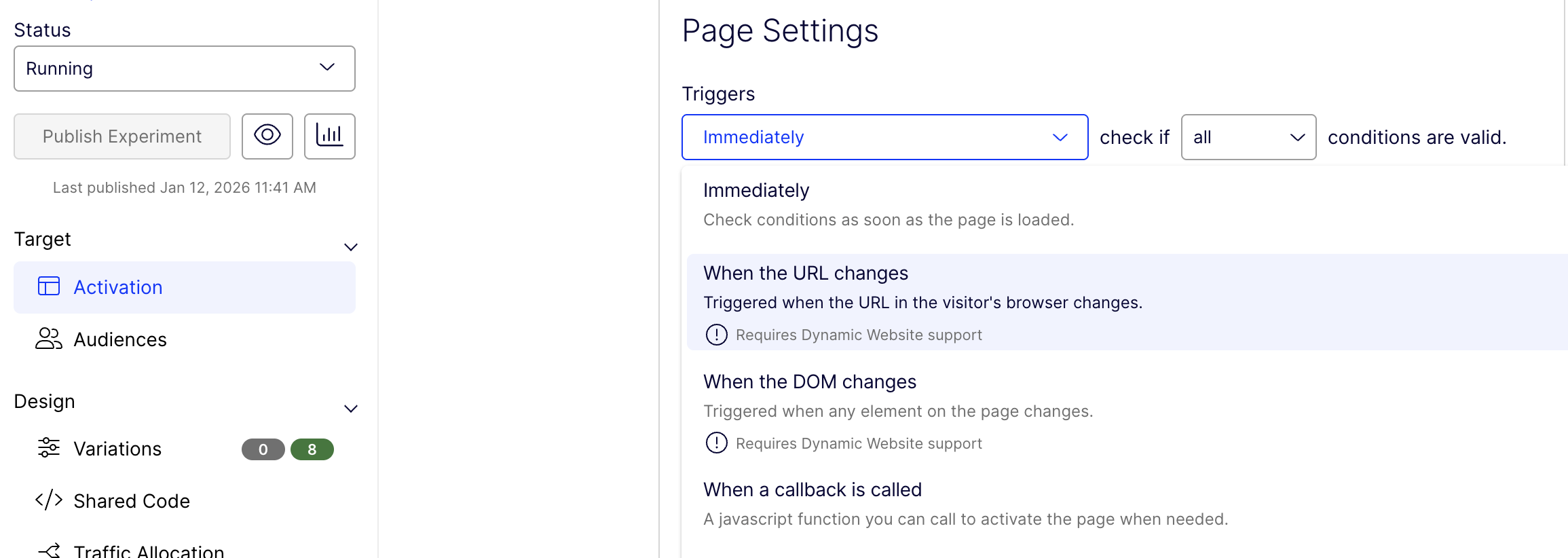
The screenshot above shows Optimizely → Experiment → Activation, which controls when Optimizely evaluates page conditions and activates an experiment.
By default, in Optimizely:
- Experiment code runs once on the initial page load
- SPA navigation does not automatically re-run activation
- DOM changes are not guaranteed to be ready at activation time
For SPAs, Optimizely relies on:
- Manual or trigger-based re-evaluation
- Dynamic element detection
- Optional callback-based activation
This is why correct trigger selection and DOM readiness handling are critical.
Page Activation Triggers in SPAs
1. “Immediately” (Default Trigger)
What it does
- Evaluates page conditions as soon as the page loads
- Designed for traditional multi-page websites
Why it fails in SPAs
- SPA routes load after the initial page load
- Components render asynchronously
- DOM elements may not exist yet
Result
- URL condition may pass ❌
- DOM is missing ❌
- Experiment never activates
2. “When the URL changes” (SPA-friendly)
What it does
- Re-evaluates page conditions when the browser URL changes
- Works with history.pushState / replaceState
When to use
- Route-based experiments (e.g. /checkout, /configure/step-2)
- React, Angular, Vue, Next.js applications
Limitations
- URL can change before DOM is ready
- Does not guarantee element availability
Best practice
- Use this trigger together with defineOptiReady(), not instead of it.
3. “When the DOM changes” (Powerful but risky)
What it does
- Activates the experiment on any DOM mutation
Pros
- Useful when elements are injected dynamically
- Can catch late-rendered components
Cons
- Can fire multiple times
- High risk of duplicate execution
- Potential performance impact on large SPAs
When to use
- When routing hooks are unreliable
- When element timing is unpredictable
Golden rule Always guard execution with a global flag:
if (window.__optiExpApplied) return;
window.__optiExpApplied = true;
4. “When a callback is called” (Most control)
What it does
- Allows developers to manually activate the page via JavaScript
Why this is powerful
- Full control over when Optimizely runs
- Can align perfectly with:
- Router events
- Data readiness
- Component mount completion
This is ideal for complex, high-impact SPA experiments owned by frontend teams.
How This Relates to defineOptiReady()
Even with the correct activation trigger:
- Optimizely may activate before elements exist
- React/Vue re-renders may replace DOM nodes after activation
That’s why teams combine:
- Correct trigger selection
- defineOptiReady() for DOM stability
- Execution guards to prevent duplication
This combination is the most stable Optimizely SPA pattern in production.
Using defineOptiReady() for Dynamic Elements
In most Optimizely SPA implementations, teams use a helper like defineOptiReady() to safely run experiment logic when dynamic elements appear.
This approach is preferred over raw querySelector checks.
Why defineOptiReady() Is Needed
- SPA components mount after API responses
- React/Vue frequently re-render and replace nodes
- Direct selectors can fail intermittently
defineOptiReady() ensures:
- The element exists
- The experiment runs at the correct time
- Execution is stable across browsers and devices
Example: Using defineOptiReady() in Optimizely
function defineOptiReady() {
  const listeners = [];
  const doc = window.document;
  const MutationObserver =
    window.MutationObserver || window.WebKitMutationObserver;
  let observer;

  function ready(selector, fn) {
    // Store the selector and callback to be monitored
    listeners.push({
      selector,
      fn,
    });
    if (!observer) {
      // Watch for changes in the document
      observer = new MutationObserver(check);
      observer.observe(doc.documentElement, {
        childList: true,
        subtree: true,
      });
    }
    // Check if the element is currently in the DOM
    check();
  }

  function check() {
    // Check the DOM for elements matching a stored selector
    for (let i = 0, len = listeners.length, listener, elements; i < len; i++) {
      listener = listeners[i];
      // Query for elements matching the specified selector
      elements = doc.querySelectorAll(listener.selector);
      for (let j = 0, jLen = elements.length, element; j < jLen; j++) {
        element = elements[j];
        if (!element.ready) {
          element.ready = [];
        }
        // Make sure the callback isn't invoked with the
        // same listener more than once
        // due to other mutations
        if (!element.ready[i]) {
          element.ready[i] = true;
          // Invoke the callback with the element
          listener.fn.call(element, element);
        }
      }
    }
  }

  // Expose 'ready'
  window.optiReady = ready;
}
Usage inside an Optimizely experiment:
defineOptiReady();
window.optiReady('button[data-test="checkout:banner:save_my_build"]', () => {
  init();
});
Common Mistakes to Avoid
- Relying only on URL targeting in SPAs
- Running experiment code only on initial page load
- Not guarding against re-execution
- Using raw querySelector without waiting
Optimizely SPA Golden Rules
- Detect route changes explicitly
- Wait for dynamic elements using defineOptiReady()
- Guard experiment execution