Overview
One of the most common requirement in coding AB Tests is picking contents from various different pages of a web app and then displaying it on the test page. There are many ways to pick content dynamically from other pages as follows:
Make an XMLHttp or Fetch request to the page
If the content that we need to pick is directly available in the source code of the page, we can make an Ajax/XMLHttp request to the page to get the content.
xhr.responseType = 'document';
While sending the xhr request, make sure to set the responseType as document. This will indicate that we are expecting HTML in the response. This HTML can directly be parsed using xhr.responseXML
Below is an utility function that picks HTML from the section of a page.
/**
* loadPageSection: To load the section/element of another page
* @param {string} URL of the page
* @param {string} Css Selector of element or section that needs to be picked
* @param {function} callback function executed after section is loaded
*/
function loadPageSection(url, selector, callback) {
    // Checks to make sure no unwanted value was passed to the function
    if (typeof url !== 'string') {
        throw new Error('Invalid URL: ', url);
    } else if (typeof selector !== 'string') {
        throw new Error('Invalid selector selector: ', selector);
    } else if (typeof callback !== 'function') {
        throw new Error('Callback provided is not a function: ', callback);
    }

    // Create an XMLHttp request

    var xhr = new XMLHttpRequest();
    var finished = false;

    // pass null to the callback in case of error
    xhr.onabort = xhr.onerror = function xhrError() {
        finished = true;
        callback(null, xhr.statusText);
    };

    // When the response is recieved
    xhr.onreadystatechange = function xhrStateChange() {
        if (xhr.readyState === 4 && !finished) {
            finished = true;
            var section;
            try {
                section = xhr.responseXML.querySelector(selector);
                // pass the element to the callback function
                callback(section);
            } catch (e) {
                // pass null to the callback function in case of exceptions
                callback(null, e);
            }
        }
    };

    // send the request
    xhr.open('GET', url);
    xhr.responseType = 'document';
    xhr.send();
}
This can be written using Fetch API as well
/**
* loadPageSection: To load the section/element of another page
* @param {string} URL of the page
* @param {string} Css Selector of element or section that needs to be picked
* @param {function} callback function executed after section is loaded
*/

function loadPageSection(url, selector, callback) {
    fetch(url).then(function (response) {
        // The API call was successful!
        return response.text();
    }).then(function (html) {

        // Convert the HTML string into a document object
        var parser = new DOMParser();
        var doc = parser.parseFromString(html, 'text/html');

        try {
            section = doc.querySelector(selector);
            // pass the element to the callback function
            callback(section);
        } catch (e) {
            // pass null to the callback function in case of exceptions
            callback(null, e);
        }
    }).catch(function (err) {
        // There was an error
        console.warn('Something went wrong.', err);
    });
}
jQuery provides us with the load function that loads data from the server (Source page) and place the returned HTML into the matched elements.
$(targetselector).load(`${url} ${sourceSel}`), () => {
    // loaded
    // perform next steps here
});
Let’s take an example to understand in a better way.
In a recent campaign POCT25, we pulled the recommended cruises section present on home page to the search page i.e. https://www.xxcruises.com.au/cruises/search
A simple code in jQuery to achieve this using load function would be as follows:
jQuery('.custom-error-message-wrap .custom-recommended-wrap').load('https://www.xxcruises.com.au/ .bg-pacific-blue.calm-wave-pacific-blue-before+div .container-fluid');
In Vanilla JS, Xhr or Fetch API can be used to achieve the same results.
After using this code, you will notice that price is not showing up on the recommended tiles. Let’s move to the next topic to find out.
When the content is not present in source
If the content that we need to fetch from another page doesn’t exist in the source code of the URL, explore the network tab in the browser console and find the request that contains the data. In these cases, the content is sent in the form of JSON.
In the earlier example, we noticed that price is fetched by another API request i.e.
https://api.xxcruises.com.au/cruiseresults/lead-in-fare?voyageCode=${cruiseCode}
const sourceUrl = `https://www.xxcruises.com.au/`;
jQuery('.custom-error-message-wrap .custom-recommended-wrap').load(`${sourceUrl} .bg-pacific-blue.calm-wave-pacific-blue-before+div .container-fluid`);
// Fetch the price using another API for each recommended cruise one by one using each loop
jQuery('.find-cruise-widget__banner [cruise-deal]').each((index, ele) => {
    const cruiseCode = jQuery(ele).attr('voyage-code');
    jQuery.get(`https://api.xxcruises.com.au/cruiseresults/lead-in-fare?voyageCode=${cruiseCode}`, (data) => {
        const fromPrice = data.FromPrice.toFixed(2).split('.');
        jQuery(ele).append(`<div class="theme-cruise-deal" data-button-loader="loading" data-dot-color="dotColor">From</span> <span class="integer-part">$${fromPrice[0]}</span> <span class="self-start precision-part">.${fromPrice[1]}</span><span class="flama-cond text-uppercase">pp / ${data.CabinSize} person room</span></div>`);
    });
});
Use another page as an iframe
Its a dirty hack, however, its the only solution in some cases.

Pulling data using xhr or fetch fail when there is a cross origin request. In these cases, you will see the error below:
Access to XMLHttpRequest at 'https://xyz.com/abc/' from origin 'https://www.xxcruises.com.au' has been blocked by CORS policy: No 'Access-Control-Allow-Origin' header is present on the requested resource.
In REST5, requirement 9 in the linked slide, required us to Pull “articles section” content from https://www.xxmed.com.au/ to https://shop.xxmed.com.au/. As you can notice that both domains are different, so making a request results in the cross origin error:
Access to XMLHttpRequest at 'https://www.xxmed.com.au/' from origin 'https://shop.xxmed.com.au' has been blocked by CORS policy: No 'Access-Control-Allow-Origin' header is present on the requested resource.
jQuery('head').append('<div class="rest5_articles"><iframe id="homePageFrame" frameBorder="0" src="https://www.xxmed.com.au/?rest5=true"></iframe></div>');
Before we dig into REST5 solution, let’s talk about the two kind of iFrames.
Same domain iFrames
Add the iframe and interact with the iframe using the jQuery contents API.
const frameObj = document.getElementById(frameID);
const frameContent = frameObj.contentWindow.document.body;

// jQuery
const frameObj = $('#frameID');
const frameContent = frameObj.content().find('body');
Example Scenario: Quick View Popups on the PLP pages where we need to fetch the content and functionality from the corresponding product pages.
Cross domain iFrames
postMessage API enables communication between cross-origin frames using a handshake mechanism ensuring safety.
One iFrame window dispatches the message and other iFrame is free to listen to the message or vice-versa
Take a look at the syntax:
targetFrame.postMessage(message, targetOrigin);
targetFrame: A reference to the window that will receive the message
message: Data to be sent to other window. This data is serialized.
targetOrigin: Specifies the origin of targetFrame for the event to be dispatched, either as the literal string “*” (indicating no preference)
window.addEventListener("message", (event) => {
  if (event.origin !== "http://example.org")
    return;

  // ...
}, false);
In the REST5, after including the homepage as an iFrame and displaying the articles section, a click to any of the article tile will result in opening the new page inside the iframe which is weird user experience right?. Therefore, to fix this, you would need to write a code to listen to the events from iframe and send a message to the parent frame by using the postMessage API. Once the message is received by the top frame, make a redirection from the top frame.
Take a look at the below code:
Listening to postMessage on Parent Frame
    function clickOnBlog() {
        const eventMethod = window.addEventListener
            ? 'addEventListener'
            : 'attachEvent';
        const eventer = window[eventMethod];
        const messageEvent = eventMethod === 'attachEvent'
            ? 'onmessage'
            : 'message';

        eventer(messageEvent, (e) => {
            // if (e.origin !== 'http://the-trusted-iframe-origin.com') return;
            console.log(`Message from iframe just came!${e.data}`);
            if ((typeof e.data === 'string' && e.data.indexOf('location') > -1)
            || (typeof e.message === 'string' && e.message.indexOf('location') > -1)) {
                console.log(`Message from iframe just came!${e.data}`);
                eval(e.data);
            }

            console.log(e);
        });
    }
Generating a postMessage after blogs are clicked
    jQuery('.article-listing__list .article-box').click((e) => {
        const clickValue = jQuery(e.currentTarget).attr('onclick');
        window.parent.postMessage(clickValue, '*');
    });
Build a caching server using Node, Express, Redux, herokuapp and Cheerio
When we have to combine data from multiple pages or requests and pre-process it, a caching server can be built to scrape the data from the website and process it. The processed data is then exposed on an end point.
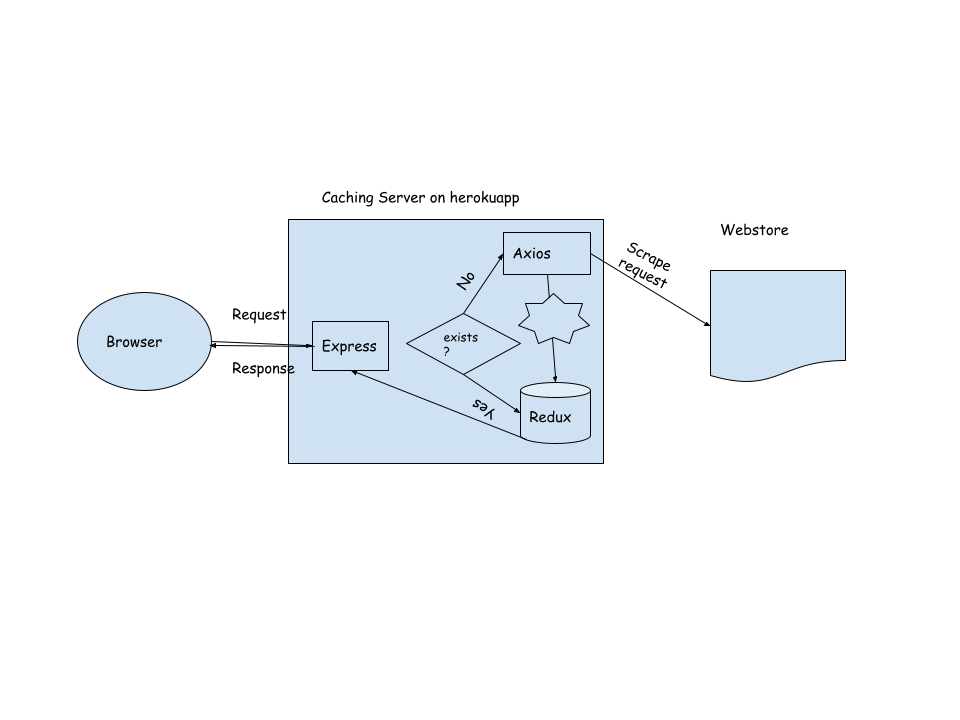
- Set Up the Express Server Application using express and create an endpoint to listen to the requests
- Make a request to the destination page using a npm plugin like axios or requestretry
- Process the data using cheerio and save it using a redux store and return it as a response as well
- When the same request come, first check in the redux store before making a request to the page